Evaluating Software Readiness for Laser and Press Brake Integration in Metal Fabrication Shops
In metal fabrication, every advantage counts. The best shops are built on rock-solid work ethics, attention to detail, and the willingness to embrace technology that delivers clear results on the shop floor. When integrating advanced equipment like lasers and press brakes, success rides not only on talented operators and capable machines, but also on your shop’s software readiness. Ensuring the software can keep up, connect every workflow, and eliminate rework is critical to staying productive, profitable, and ahead of the competition.
Assessing Compatibility with Existing Machinery and Controllers
Before integrating lasers and press brakes into your operation, it’s crucial to assess whether your software can communicate smoothly with your current machines and their controllers. Every make and model—from Amada and TRUMPF to Bystronic, Mazak, or LVD—can have unique communication protocols and requirements. If your software lacks direct post-processors for your controllers, you’ll be stuck fighting file errors, manual intervention, or missing out on powerful machine features.
When evaluating compatibility, insist on compatibility checks by your software supplier. Request confirmations that the system handles your particular controller (e.g., Siemens, Fanuc, or proprietary OEM controllers) out of the box. Reliable vendors often provide machine libraries, customizable post-processors, and regular updates to support new models.
From a sales perspective, many software companies will tout their ability to "drive any machine." Ensure they can provide real-world proof—preferably customer references with similar laser and press brake makes—to back up claims. In your operation, compatibility means you can set up programmed jobs for both the laser and press brake, using the same dataset, without endless tweaking or resorting to manual workarounds. This eliminates wasted time and reduces the risk of costly mistakes.
Key Software Features for Seamless Laser and Press Brake Workflow
Integrated workflows depend on a core set of software functionalities that bridge every step, from part design to final bending. First and foremost, your software should include robust CAD import capabilities, supporting all common file types (DXF, STEP, IGES), as well as easy editing tools for quick design changes on the fly.
Efficient nesting capabilities are vital for laser cutting. Look for software that maximizes sheet utilization, reduces scrap, and automates common nesting tasks—even as jobs change late in the process. For press brake operations, the system should include advanced bend simulation (3D bending simulation), automatic tool selection, and detailed setup instructions, all derived from a single approved part design.
Sales solutions often bundle these features into “one-stop-shop” packages (like BySoft, LVD CADMAN, or Amada Dr.ABE), which streamline your shop’s workflow from design through nesting, laser programming, bending simulation, and even scheduling. This level of integration lets your operators work with confidence: every part cut fits in the brake exactly as planned, and setups take less time thanks to clear, accurate instructions.
Technically, your software should keep up to date with tooling libraries, allow quick changes for rerouted parts, and offer collaborative features for design, programming, and production staff—leading to fewer handoffs, fewer delays, and more throughput with the same resources.
Ensuring Accurate Data Exchange Between Design, Nesting, and Production
A common pain point in metal shops is lost or misinterpreted data between departments. If your design team hands off a part file to the programmer, who then generates the nest, who then passes data to the press brake operator, any disconnect (incorrect bend lines, wrong tool, out-of-date revision) can mean wasted material and hours of rework.
The best software platforms solve this by maintaining a single "source of truth" file. Every time a part is updated, all related manufacturing data updates automatically—nesting, laser code, bend allowances, tool setup, even material callouts. Well-integrated solutions include built-in revision and change control, ensuring everyone is working with up-to-date, synchronized information.
From a logistical angle, accurate data exchange also streamlines progressive assembly, reduces time spent searching for missing info, and supports just-in-time workflows. Choose software that links job orders, part models, and work instructions, ideally with easy barcoding or job tracking for each sheet or batch—a must for progressive material handling and minimizing shop floor confusion.
Optimizing Process Automation and Error Reduction
One of the largest gains you will see from integrating new software is in process automation. Good software doesn’t just transfer files; it actively automates repetitive, error-prone steps that slow down production. Whether it’s automating tool selection, generating detailed bend sequences, or creating optimized laser nests in minutes, the system should handle what used to take hours manually.
Progressive assembly methods benefit greatly, as automatic sequencing allows parts to flow from laser to brake with minimal human intervention. Material handling jobs become less about guesswork, and more about following the software-driven roadmap. Leading solutions let you define standard setups, reuse proven jobs, and flag irregularities before parts reach the floor, slashing the risk of scrapped material or missed deadlines.
From the perspective of efficiency, look for software that allows scheduling, machine balancing, and predictive maintenance—all while logging activity for later analysis. Smart error prevention tools, like simulation and collision detection (especially important for bending complex shapes), keep jobs running smoothly and safely.
Measuring Return on Investment and Ongoing Support Benefits
Big investments, like updating your software for laser and press brake integration, need to show a tangible ROI. Luckily, costs recoup quickly through labor savings, improved sheet utilization, faster setup times, and reduced scrap and rework. Track metrics before and after transition—look at setup hours per job, material yield, cycle times, and even operator overtime—to prove the payoff.
When choosing software, factor in the value of ongoing support and frequent updates, especially as machine firmware, controller models, or shop requirements change. Honest vendors offer real, local technical help that gets you back online fast, should an integration hiccup occur.
Over time, the right software keeps your shop flexible: adding new lasers or press brakes is far easier when your workflow was designed for plug-and-play integration. Plan with scalability in mind and build a relationship with a supportive partner for years to come.
Frequently Asked Questions
What are the key benefits of integrating laser and press brake software?
You gain smoother workflows, less manual data entry, faster setups, and reduced material handling.
How does the right software reduce errors or rework?
By keeping all job data synchronized and updated throughout design, nesting, and production, errors due to outdated files or miscommunication drop dramatically.
Will I need to upgrade my machinery to benefit from new software?
Not always. Many modern solutions work with existing equipment, but confirm your machines/controllers are supported before purchase.
Does integrated software increase material efficiency?
Yes, good nesting and progressive assembly logic boost sheet utilization and minimize waste.
Is investing in new software expensive compared to manual programming?
There is an upfront cost, but savings in labor, scrap, and faster job turnaround often make the payback period quite short.
What if my staff isn’t tech-savvy?
Most solutions offer training and user-friendly interfaces, plus reliable support as your team gets comfortable with the upgrade.
To stay competitive in today’s metal fabrication market, it’s vital that your shop’s software keeps pace with the capabilities of your laser and press brake equipment. Proper evaluation, clear communication with your vendors, and a focus on workflow integration will set your operation up for long-term growth and efficiency.
Ready to take your shop’s productivity to the next level? Talk with your software vendor about your current and future machine mix, and collaborate on a hands-on demo and compatibility review. Don’t let outdated systems hold your best people and equipment back—invest in the tools that make every job count.
Integrating lasers and press brakes with modern “smart fabrication” software in a metal fabrication shop is a major investment that hinges less on the hardware itself and more on whether your current and planned software environment can reliably handle nesting, bending simulation, data flow, and shop-floor control across both processes.
In Brief
- Pricing estimate (USD): $900,000 – $2,000,000 for a combined laser, press brake, and integrated software/cell-level solution, depending on configuration and automation level.
- Software readiness is primarily about clean data flow: CAD import, CAM for laser and bending, offline programming, and feedback from the machines.
- Effective integration reduces manual programming, setup time, and rework by synchronizing laser cut geometry with bend sequences and tooling.
- Shops should assess current CAD/CAM, ERP/MRP, and shop-floor systems to see if they can support shared part databases, revision control, and automated job routing.
- Performance considerations include how many parts/programs per day the software can handle reliably, and how well it manages complex bend sequences and material variations.
- Successful projects typically phase in integration: start with CAD/CAM and nesting, then add press brake offline programming, then connect to scheduling/ERP and feedback loops.
Budgeting & Pricing
- Pricing estimate (USD): $900,000 – $2,000,000, covering a fiber laser system, one or more CNC press brakes, and integrated software plus basic automation and installation.
- Software-related costs can include CAD/CAM licenses for laser and bending, nesting modules, offline press brake programming, and integration to ERP/MES or scheduling tools.
- Expect additional spending for implementation services: data migration, post-processor setup, custom reports, and interfaces to existing systems.
- Training and change-management often require a dedicated budget line for programmer and operator upskilling on new software workflows.
- Ongoing annual costs typically include software maintenance contracts, update/upgrade fees, and potential subscription costs for cloud-based modules.
- Budget for networking and infrastructure: servers or industrial PCs, reliable backup systems, and secure remote access for vendor support.
- Contingency funds are advisable for unforeseen integration tasks such as cleaning legacy CAD data or rationalizing part numbering before go-live.
Key Selection Factors
- Data and file compatibility: Ability to import common CAD formats, maintain a single source of truth for parts, and share geometry between laser cutting and bending modules without rework.
- Laser and press brake programming depth: Support for nesting, lead-ins/lead-outs, micro-joints, and detailed bend simulation including tooling selection, collision checks, and bend sequence optimization.
- Scalability and throughput: Capacity to manage the expected volume of parts, revisions, and daily program changes as the number of lasers/press brakes grows.
- Integration with existing systems: Interfaces or APIs to link with ERP/MRP, quoting, scheduling, and quality systems so jobs, materials, and routings stay synchronized.
- Shop-floor usability: Clear operator interfaces at the laser and press brake, with program selection, setup instructions, and feedback (e.g., job status, scrap reasons) that match how the shop actually runs.
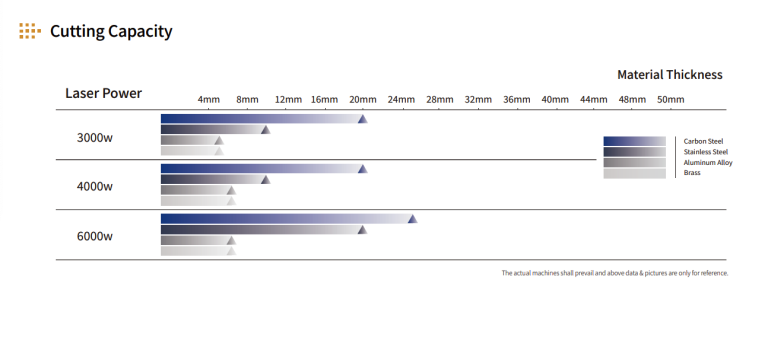
- Material and part complexity: Capability to handle different materials and thicknesses, complex bend geometries, and small-batch/high-mix work without excessive manual intervention.
- Traceability and revision control: Version management so that laser and press brake always run matching revisions of the same part, with history of changes and approvals.
Buying Advice
- Confirm that your current CAD/CAM data is clean and structured enough to feed an integrated laser/press brake workflow without constant manual fixes.
- Map existing processes for quoting, programming, scheduling, and feedback to identify where software integration will realistically save time or reduce errors.
- Ask vendors to demonstrate end-to-end workflows using sample parts: from CAD import through laser nesting, bend simulation, and NC code generation.
- Check that the software supports your material range and typical part geometries, including any special features like forming, embossing, or tight bend radii.
- Evaluate how the system handles tooling libraries, press brake setup sheets, and automatic tool selection to reduce setup times.
- Inspect available integration options for your existing ERP/MRP or scheduling system, and clarify what is standard versus custom work.
- Assess training plans for programmers, operators, and supervisors to ensure they can actually use the integrated functions in daily production.
- Review the vendor’s update and support policy, including response times, remote diagnostics, and how new machine models or software modules are added.
- Plan a phased rollout with measurable milestones (e.g., percentage of parts programmed offline, reduction in brake setup time) instead of a single big-bang changeover.
- Document responsibilities between your team and the vendor for data preparation, testing, and acceptance criteria before final sign-off.
Buyer Questions
How do I know if my shop is ready for laser and press brake software integration? Review whether you have consistent CAD standards, stable part numbering, and defined workflows for programming and scheduling; if these are in place, you are closer to being ready for integrated software.
Can I integrate software with existing lasers and press brakes, or do I need new machines? Integration often depends on the control hardware and available interfaces on your current machines; this needs to be checked case by case with both your machine and software vendors.
What benefits should I expect from integrating laser and press brake software? Typical goals include reduced programming and setup time, fewer bending errors, better material utilization, and more reliable scheduling across cutting and forming.
Is offline press brake programming necessary for integration? It is not strictly required, but offline programming is a key enabler for full integration, allowing bend simulations and tool setups to be coordinated with the laser programs.
How important is ERP integration for a smart fabrication setup? ERP integration is important if you want automated job release, material tracking, and real-time status; without it, benefits are limited to the programming and machine level.
What kind of training is typically required? Programmers need training on CAD/CAM, nesting, and bend simulation, while operators need instruction on loading and running programs, interpreting setup data, and providing feedback into the system.
How long does a typical integration project take? Timelines vary widely with scope and data readiness; projects are often phased over multiple months to allow testing and gradual adoption.
Can the software handle high-mix, low-volume work? Many integrated systems are designed for high-mix environments, but you should verify that nesting, bend simulation, and job changeovers are efficient for your typical batch sizes.
What happens if I change material or thickness after programming? The impact depends on how the software handles material libraries and bend allowances; re-simulation and updated programs may be required to maintain part quality.
How do I measure success after implementation? Track metrics such as programming hours per part, brake setup time, scrap and rework rates, and on-time delivery before and after integration to quantify improvements.
Source: Evaluating Software Readiness for Laser and Press Brake Integration in Metal Fabrication Shops
Evaluating Software Readiness for Laser and Press Brake Integration in Metal Fabrication Shops