Laser Cutting Speeds by Wattage Explained: Practical Insights for Metal Fabrication Managers
Metal fabrication is built on the balance between efficiency, quality, and cost. Every successful shop is led by managers who work harder and smarter, harnessing practical technical knowledge to solve daily challenges. From my firsthand experience, understanding real-world laser cutting speeds across different wattages is not just a science—it’s a productivity game-changer. With increasingly complex customer demands and tight schedules, it’s essential to match your equipment, processes, and team workflows for optimal performance.
Understanding Laser Cutting Speeds in Metal Fabrication
Laser cutting speed impacts everything from work order turnaround to labor efficiency. While many machine brochures advertise eye-popping speeds, real shop-floor cutting rates depend on material, thickness, part geometry, and machine programming. A manager should use catalog metrics as a starting point, but make decisions grounded in practical performance: always consider how often your operators can feed, cut, unload, clean, and prep parts using a given wattage and setup.
Sales reps especially should clarify expectations—theoretical “maximum speeds” are less meaningful than actual job-site measurements. Reliable machines like the Bystronic ByStar Fiber or Trumpf TruLaser series have proven track records and are built for round-the-clock use. Logistics-wise, prioritize machines with automatic shuttle tables and intuitive nesting software; these tools decrease manual material handling and make the progressive assembly process far smoother.
How Wattage Influences Laser Cutting Performance
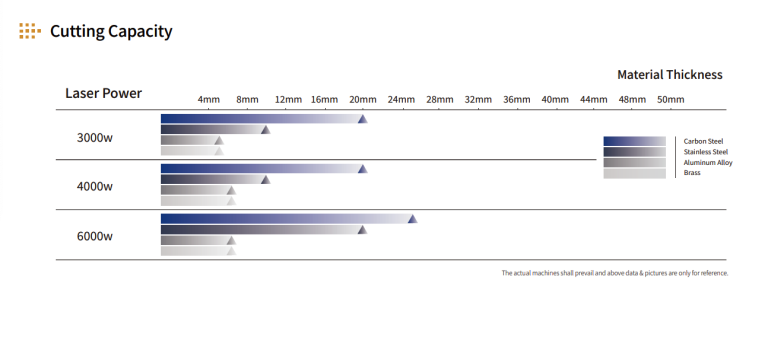
Laser wattage determines the energy delivered to each cut, but the best choice depends on your most common material jobs and desired throughput. Higher wattage (e.g., 6kW to 12kW fiber lasers) cuts thicker and faster, especially with mild steel, aluminum, and stainless. If much of your work is under 1/4" thickness, a 4-6kW machine can offer an outstanding balance of speed and energy efficiency.
It’s tempting for a buyer to chase the highest wattage for bragging rights, but real ROI comes from aligning machine power with part mix. For example, 10kW machines can slice through 1" mild steel at impressive rates, but tend to be overkill for thin gauge runs and may consume more electricity or require extra investment in extraction/cooling. Consider lasers with variable power settings and fast piercing capabilities, like those from Amada’s ENSIS line for versatility and minimal rework.
Sales solutions should highlight not just maximum speed but how wattage affects maintenance schedules, consumable costs, and energy usage in daily practice. Ask your machine supplier for field case studies from similar production environments.
Optimizing Material Types and Thickness for Speed and Precision
Matching your laser’s wattage with actual shop work is central to both speed and cut quality. Not all metals respond equally—cutting aluminum is notoriously slower and more finicky than mild steel, despite the same wattage rating. Likewise, stainless thicker than 1/2" may require a specialized assist gas blend or nozzle configuration.
A progressive assembly routine—grouping similar parts and materials by thickness—lets you maximize nesting efficiency and cut multiple jobs in one cycle, reducing handling. Look for machines with smart automation: for example, Mazak’s OPTIPLEX series enables dynamic focus adjustment for different metals mid-run, saving on setup times and scrap rates.
Work with sales engineers to test large sample batches using real job drawings, not just controlled demo coupons. This ensures that machine specs align with your process, especially for precision jobs like tabbing, micro-joints, or edge-cut features needing minimal secondary finishing.
Practical Strategies to Maximize Throughput and Minimize Downtime
A laser’s rated speed is only as good as the system supporting it. To truly maximize throughput, invest in end-to-end automation: tower loaders, robotic unloaders, and integrated conveyors cut manual movement by 50% or more. Well-equipped operations using Salvagnini or Prima Power systems report running “lights-out” shifts where operators focus on programming and QC rather than lifting sheets.
Routine maintenance is also critical. High-wattage lasers put more thermal load on optics and machine beds, so proactive cleaning, nozzle change routines, and linear rail greasing prevents emergency downtime. Organize your team around lean workflow cells—operators can prep, inspect, and pack finished parts near the machine, flowing material straight from laser to brake without unnecessary fork truck trips.
Sales teams should include total solutions in quotations, not just the machine: propose layout changes, racking systems, or software upgrades that turn nominal “speed” improvements into true finished-part throughput.
Evaluating Cost-Benefit Impacts of Different Laser Wattages
When justifying investment in a new laser, compare not only purchase price but the ongoing cost per cut part. Higher-wattage machines may cost more upfront but deliver lower labor and operating costs on thick or high-volume jobs. Conversely, small jobbing shops with mostly light gauge work benefit most from mid-range machines that use less power and need fewer expensive spare parts.
Decision-makers should weigh machine uptime, energy consumption, operator training, and projected service life. Many modern lasers offer remote diagnostics and predictive maintenance, shrinking long-term support costs.
Sales professionals can help by providing detailed cost-per-part and break-even analyses. For example, a 10kW system might yield a positive ROI in 18 months for a shop cutting multiple shifts of 1/2" plate, but take three years to pay for itself in a prototype-focused environment. Ask for software demos to simulate actual project schedules using your own material type/part files for a true picture.
Frequently Asked Questions
What are the main benefits of upgrading to higher-wattage laser cutters?
Higher wattage boosts cut speeds and allows for thicker material processing, increasing overall shop flexibility and productivity.
Does higher wattage always mean better quality?
Not always—cut quality is a result of correctly matched wattage, material, and machine settings. Too much power on thin material may even reduce edge quality.
How much does machine automation improve efficiency?
Automation can double throughput and reduce manual material handling, cutting labor costs and minimizing errors.
Are fiber lasers better than CO2 for all metal jobs?
For most metals, especially thinner gauge materials, fiber lasers offer greater speed and lower operating costs, though CO2 can still provide superior quality in certain thick or non-metal jobs.
How important is preventative maintenance with higher-power lasers?
Critical—higher wattage stresses components more, so scheduled downtime for cleaning and inspection prevents costly failures and prolongs machine life.
What’s involved in transitioning an existing shop to newer laser technology?
Key steps include operator retraining, updating nesting/CAD software, and reviewing shop floor layouts for better part flow and reduced load times.
Staying competitive means marrying sharp work ethic to the latest technical knowledge—know what your laser system can do, and where every watt counts. Talk to your sales reps about the true, delivered cutting speeds for your products and shop floor, build relationships with service partners, and leverage real-world cutting data to guide every purchasing decision. With this approach, your shop will not only meet today’s demands but set the pace for what’s next in metal fabrication.
For more guidance or practical case studies, connect directly with trusted machinery partners or reach out to other local shops for field feedback—your next boost in productivity may be just one good conversation away.
Understanding how laser wattage translates into real cutting speeds is essential for metal fabrication managers who need to balance throughput, cut quality, and operating cost when specifying or upgrading high‑power laser cutting systems.
In Brief
- Laser power (wattage) primarily affects how quickly a machine can cut through a given material thickness, but it is not the only limiting factor—assist gas, beam quality, motion system, and nesting strategy also matter.
- Higher wattage generally enables faster straight-line cutting in thicker materials and more capacity per shift, but may offer diminishing returns on very thin sheet where acceleration and part geometry dominate cycle time.
- For many fabrication shops, “right-sizing” wattage to their dominant material thickness range is more cost-effective than simply buying the highest power available.
- Managers should consider not only maximum feed rate but also real-world productivity: pierce times, part changeover, material handling, and uptime all influence effective cutting speed.
- Smart programming (common-line cutting, micro-joints, optimized lead-ins) and good process parameters can narrow the gap between mid-range and ultra-high-power machines in day-to-day production.
Typical Cost Ranges
Pricing estimate (USD): $900,000 – $2,000,000 USD for a modern, high-power industrial laser cutting system with automation and controls aimed at serious metal fabrication throughput.
- Lower end of this range typically corresponds to systems with moderate wattage, simpler automation, and more basic material handling capacity.
- Upper end reflects higher wattage, larger working envelopes, more sophisticated automation (load/unload, towers, sorting), and advanced process monitoring.
- Ongoing operating costs (power, assist gas, consumables, maintenance) can be significant relative to the purchase price and should be evaluated per part or per hour of cutting.
- Software, training, and integration with existing production systems can add to initial investment but often yield faster realization of the machine’s cutting-speed potential.
- When comparing quotes, normalize by the material mix, expected annual cutting hours, and target throughput rather than just headline wattage or table size.
Key Selection Factors
- Wattage vs. Material Thickness Mix – Match laser power to your primary material thickness bands; very high wattage is most beneficial where a significant share of work involves thicker plate or high-volume cutting.
- Effective Cutting Speed, Not Just Feed Rate – Consider pierce time, acceleration/deceleration, and contour complexity; for thin gauge parts with many small features, motion dynamics can matter more than raw wattage.
- Cut Quality at Speed – Evaluate edge smoothness, dross, and kerf consistency when running at aggressive speeds; higher power must be controllable to avoid excessive heat input and quality defects.
- Table Size and Part Nesting – Larger beds enable better nesting and fewer sheet changes, which can offset slightly slower cutting speeds by reducing non-cutting time.
- Automation and Material Handling – Load/unload systems, storage towers, and part sorting can keep the laser cutting continuously; without this, wattage gains may be underutilized.
- Process Controls and Monitoring – Look for controls that manage power ramping, piercing routines, and real-time cut monitoring to maintain high speeds with consistent quality.
- Energy and Utility Requirements – Higher wattage often increases electrical and assist gas demand; ensure your facility infrastructure and operating budget can support the chosen power level.
Buying Advice
- Clarify your dominant material thicknesses and annual cutting hours for each; use this to set a realistic wattage target rather than defaulting to the maximum available power.
- Request sample parts cut from your own drawings and materials at different power levels, and compare both cycle times and edge quality.
- Evaluate motion performance (acceleration, cornering, small-hole behavior) because many real jobs are geometry-limited rather than wattage-limited.
- Assess the automation package—loading, unloading, and part removal—since idle time between sheets can erase much of the gain from higher cutting speeds.
- Investigate software capabilities for nesting, cut-path optimization, and parameter libraries that help operators consistently run at the top end of safe cutting speeds.
- Review total cost of ownership: power consumption, assist gas usage, consumables, and scheduled maintenance relative to expected throughput.
- Check service and support responsiveness, including remote diagnostics, as downtime on a high-throughput machine quickly becomes very costly.
- Plan for operator training and process development time so the team can safely push the machine toward its real-world cutting-speed potential.
- Consider future work mix and potential material changes; select wattage and options that leave some headroom for thicker or more demanding jobs.
- Compare multiple configurations at similar price points (e.g., slightly lower wattage with better automation vs. higher wattage with minimal automation) to see which yields more parts per shift.
Buyer Questions
How much laser wattage do I actually need? Base wattage selection on your most common material thicknesses and desired throughput; very high power mainly pays off when a significant portion of your work is medium-to-thick material where cutting speed is power-limited.
Does higher wattage always mean faster production? Not always; on thin sheet with intricate geometries, acceleration, path strategy, and handling can dominate cycle time, so the practical speed gain from extra wattage can be modest.
What should I look for when comparing cutting speeds between machines? Ask for cycle times on your actual parts, including pierce and handling, not just maximum feed rates on straight lines, and review cut quality at those speeds.
How do automation options affect cutting speed benefits? Automation keeps the laser cutting instead of waiting for material changes; without it, the theoretical gains from higher wattage may be lost in idle time.
Is it better to invest in more power or more automation? For many shops, a balanced system with moderate-to-high wattage and strong automation delivers more parts per shift than a very high-power machine with minimal handling.
How does laser power influence operating costs? Higher wattage can increase electrical and assist gas consumption, but if it significantly shortens cycle times, the cost per part may still decrease; this needs to be evaluated with your specific workload.
Can software really improve effective cutting speeds? Yes; advanced nesting, path optimization, and parameter management can reduce non-cutting motion and help maintain high speeds with acceptable quality across shifts.
What role does cut quality play when running at high speeds? Pushing speed too far can degrade edge quality and increase rework; the goal is to find a stable window where speed, quality, and downstream processes remain in balance.
How should I factor future work into my wattage choice? If you expect more thick-plate or higher-volume work, choosing a configuration with some power and capacity headroom can avoid an early upgrade.
What support should I expect after purchase? Look for process support, parameter development help, and responsive service, as these are crucial for consistently achieving the cutting speeds the machine is capable of.
Source: Laser Cutting Speeds by Wattage Explained: Practical Insights for Metal Fabrication Managers
Laser Cutting Speeds by Wattage Explained: Practical Insights for Metal Fabrication Managers